Agents
Turn a capsule into a Claude Code subagent and deliver it three ways (project files, ephemeral session JSON, or a plugin) from one source of truth.
A skill is a capability your assistant loads and follows. An agent goes further: it is a whole subagent (its own system prompt, its own tools, its own model) that Claude Code can hand a task to. Symbol lets a capsule be that subagent definition, so the capsule stays the single source of truth and every machine runs the same published version of it.
You mark a Type as Agent packaging (the "Publish as → Agent" option, editable on the Type cover page at creation and later on the Type's Options tab). Agent packaging is a default for new capsules: turning it on seeds each capsule created afterwards as an agent, and never repackages capsules that already exist. Any single capsule can also be included or excluded individually from its detail page, regardless of its Type's default. Each eligible capsule packaged as an agent (one that has both an alias and a summary, since a subagent needs a name and a description) becomes an agent definition:
- the capsule body is the subagent's system prompt,
- the capsule alias (slug) is the subagent's name (its invocation identity),
- the capsule summary is the required description,
- typed fields become the subagent frontmatter (
tools,model, …).
The same capsule reaches OpenAI Codex and ChatGPT too. This page covers the
Claude Code paths; see Codex and ChatGPT for
the Codex named agent, AGENTS.md instructions, the per-setting mapping, and
installing a workspace's plugin into Codex and ChatGPT.
Running one: claude --agent
Once an agent is available to Claude Code, the quickest way to use it is to start a session as that agent:
claude --agent forge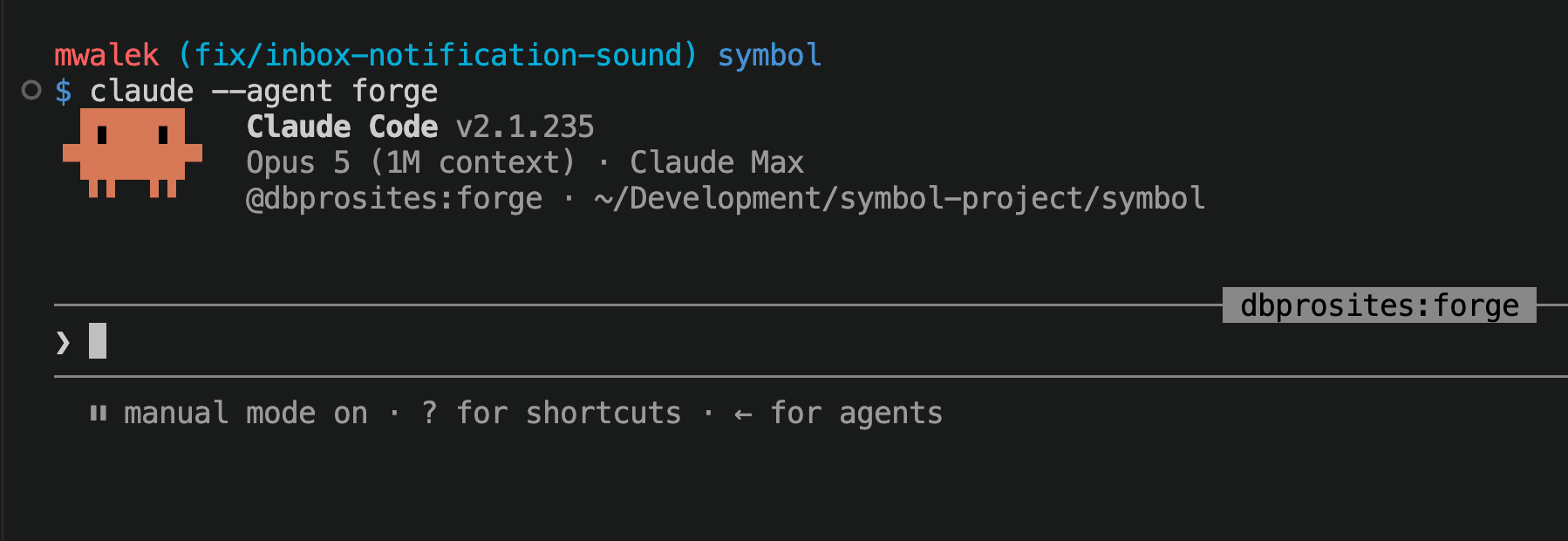
The whole session then is that agent: it runs on the agent's system prompt and
configuration rather than being a general session that hands work to it. Claude
Code shows which one it started as in the header, and ← opens the agent picker.
One field is known not to carry on this path. See the note below.
The agent has to be there first. --agent only finds agents Claude Code
already knows about, so one of the delivery paths below
has to have happened first: the plugin
installed from a
marketplace (which is how the @dbprosites:forge in the screenshot above got
there), the definitions synced into the repo, a definition in your user
directory (~/.claude/agents/), or the JSON passed in with --agents. With
none of those, the flag has nothing to match.
The machine in the screenshot happens to have the plugin installed; an agent delivered by project sync launches exactly the same way.
You can also stay in a normal session and hand one task to a subagent ("use the
forge subagent to…"), which is what Claude Code's own
invoking subagents explicitly
covers. Use --agent when the whole session should be that agent; ask for it by
name when only one step should be.
One difference worth knowing: skills an agent preloads apply when it is spawned
as a subagent, and currently do not when it runs as the main session via
--agent. That is observed Claude Code behaviour rather than a documented
guarantee, so treat it as something to verify rather than to design around.
Which delivery path do I use?
There are three ways to get a Symbol agent into a Claude Code session. They exist because they solve different problems. Pick by how the agent will be run.
| Path | What it is | Reach for it when |
|---|---|---|
| 1. Project sync | Write <name>.md files into .claude/agents/ | Humans, day to day. |
2. Ephemeral --agents | Emit JSON for claude --agents at launch | The automated pipeline. |
| 3. Plugin | Package the set as an installable plugin | Distribution to machines without the repo. |
Path 1: project sync (the default for people). symbol-agents sync writes
one <name>.md per agent into a directory in your repo (default
.claude/agents/symbol/). The definitions live in version control next to the
code, teammates get them by cloning, and Claude Code hot-reloads edits without a
restart. Because the artifacts are ordinary files in your repo, this is also the
only path where you can hand-author frontmatter Symbol does not render: hooks
(see what each path carries below; mcpServers is
now rendered, see MCP servers). Put hooks in a
separate, hand-written agent file: editing a synced one makes sync --check
report it as drifted.
Path 2: ephemeral session definitions (the pipeline path).
symbol-agents emit prints the JSON document claude --agents "$(…)" accepts and
writes nothing to disk:
claude --agents "$(node packages/mcp/bin/symbol-agents.mjs emit)"The definitions are always current (they are rendered at launch from each
agent's published version), and, crucially, --agents definitions sit above project and user
scope in the precedence order, so a stale on-disk file cannot shadow them. A
scripted run should not depend on a sync step having happened first, which is
exactly why the pipeline uses this path. emit --manifest <file> records the
capsule id + content hash of each agent it launched, so a run can log which
capsule versions it actually used.
Path 3: plugin distribution. Publishing a workspace's marketplace packages
its agents alongside its skills into an installable plugin
(/plugin marketplace add <url>). This gets agents onto machines that do not
have the repo checked out and versions the whole set as a unit. It has a real
ceiling. See what the plugin path drops below. The
Plugin Marketplace page covers enabling a
marketplace, the install command, and protecting, rotating, and recovering the
install URL.
Recommendation: the automated pipeline uses Path 2, humans use Path 1, and distribution to repo-less machines uses Path 3.
Published and current versions
All three paths deliver an agent's published version: the capsule and its Type as they were when the agent was last published. Editing the capsule does not change what is delivered unless the edit also publishes it.
- Your own edits publish themselves. When you save a capsule you may share
(your own, or, as an organization owner or Admin, one that is not Private),
its agent's published version is updated with it, so the next sync or
emitpicks up your edit. - A teammate's edit leaves the agent stale. When someone who may edit the capsule, but not share it, saves a change, it is kept on the capsule with the warning "Not republished: only someone who may share this capsule can update what teammates receive." Everyone keeps receiving the published version.
- Type edits never update agents. Changing the agent's Type, for example its template or fields, leaves every agent of that Type on its published version until someone updates it.
When the capsule is ahead of its published version, the agent menu on the capsule's page says "This capsule changed since its agent was published." and offers Update served agent, which publishes the current version. Only someone who may share the capsule can use it. Preview current version downloads the agent file the capsule renders now, which may be ahead of what your teammates receive.
Agents in an organization
Packaging a capsule as an agent delivers it to every member of the organization, so it counts as sharing the capsule:
- Packaging and updating need the right to share the capsule: its owner, or an organization owner or Admin when the capsule is not Private. Anyone else is refused. Organization API keys cannot package agents yet.
- A Private capsule is not served to the organization. Packaging one for the
first time is refused with "Share this capsule with the organization before
publishing it." An agent whose capsule is made Private later drops out of the
organization's plugin and out of every other member's
symbol-agents syncandemit, and its owner sees "Not served to the organization while Private." The owner's ownsymbol-agents syncandemitstill receive it, and it keeps following the owner's edits. Share the capsule with the organization again and everyone receives it, without publishing it again.
Precedence: what shadows what
When two definitions share a name, Claude Code resolves the conflict by scope,
in this order (highest wins):
- Managed settings (organization deployment), not used by Symbol.
--agentsCLI definitions (Path 2), above project and user scope.- Project
.claude/agents/(Path 1), closest-to-cwd first for nested dirs. - User
~/.claude/agents/.
Plugin agents (Path 3) are always namespaced as plugin-name:agent-name, so
they never collide with a local definition. The namespaced name always resolves;
a bare name also resolves when nothing else installed answers to it. The
screenshot above shows --agent forge starting @dbprosites:forge on a machine
with no local forge. Use the namespaced form when more than one source could
match, since that resolution is observed behaviour rather than a documented rule.
The dangerous case is two files in the same project tree with the same name:
Claude Code loads only one, chosen by filesystem read order. Nothing warns you.
That is why name identity matters (next section).
Names and collisions
A subagent's name is its invocation identity (@-mention, --agent <name>),
so Symbol uses the capsule's alias verbatim rather than a generated id: a
human-chosen, charset-compatible name. Aliases are unique within a Type, so
the source cannot produce a collision inside one Type. Two different agent Types
can still hold a capsule with the same alias, so symbol-agents sync:
- refuses a fetched set that contains duplicate names (naming the offenders) rather than letting filesystem read order silently pick a winner, and
- refuses to overwrite a
<name>.mdfile its manifest does not own, so a hand-written agent is never clobbered by a sync.
Am I still in sync? (drift detection)
symbol-agents sync writes a sidecar manifest.json recording, for every
materialized agent, its capsule id, ref, and content hash.
symbol-agents sync --check renders nothing. It compares the live export
against that manifest and the files on disk, and exits non-zero listing anything
that is:
- stale: the agent's published version changed, or the file was hand-edited;
- missing: an agent exists in Symbol but not on disk;
- orphaned: a file the manifest owns whose capsule is no longer an agent.
A clean --check is your proof that a materialized definition still matches its
capsule.
What each path carries
Not every frontmatter field survives every path. In the table, ✅ means the delivered definition still carries the field. Claude Code honors it on that path:
| Field | Rendered by Symbol? | Project (1) | --agents (2) | Plugin (3) |
|---|---|---|---|---|
tools, disallowedTools | ✅ v1 field | ✅ | ✅ | ✅ |
model, maxTurns, skills, color | ✅ v1 field | ✅ | ✅ | ✅ |
effort, memory, background, isolation | ✅ v1 field | ✅ | ✅ | ✅ |
permissionMode | ✅ v1 field | ✅ | ✅ | dropped |
mcpServers | ✅ v1 field | ✅ | ✅ | dropped |
hooks | ❌ not in v1 | hand-authored only | n/a | dropped |
Two separate limits are at work, and it is worth keeping them apart:
- Symbol's v1 allowlist decides what a capsule can express.
hooksis not a v1 field, so no path gets it from a capsule. On Path 1 you can hand-author it into your own agent file, and there is no equivalent on Paths 2 and 3. - The plugin ceiling decides what survives delivery. Plugin subagents
ignore
hooks,mcpServers, andpermissionMode. Two of those,mcpServersandpermissionMode, are v1 fields, so they are the ones you can actually trip over: publishing an agent that sets one succeeds but surfaces a warning, and the plugin-delivered definition is rendered without it. The plugin path cannot carry them. If you needpermissionModehonored or the agent to reach anmcpServersserver, deliver that agent via Path 1 or Path 2.
If a Type packaged as Agent omits an alias or a summary on a capsule, that capsule is skipped (a subagent must have a name and a description). The export reports each skip so nothing fails silently.
MCP servers (mcpServers)
An agent authored in Symbol is written against the capsules it will read, so it
needs a way to reach Symbol's own MCP server. Declare that with the mcpServers
field (Type field name mcp_servers, or agent_meta.frontmatter). Its value is a
list of server names, not a config object:
- The reserved name
symbolis expanded by the renderer into the inline definition of Symbol's hosted endpoint (type: http,url: https://mcp.symbol.chat/mcp). No credential is written into the artifact. The installing user authenticates at first use through the endpoint's OAuth 2.1 flow, so the grant is per-user and revocable and nothing secret is distributed in the (git-backed) marketplace repo. - Any other name (for example
github) renders as a plain reference to a server the installer has already configured under that name. Symbol cannot know a third party's config, so arbitrary inline server definitions are not authorable in v1.
A capsule with mcp_servers: ["symbol", "github"] renders:
mcpServers:
  - symbol:
      type: "http"
      url: "https://mcp.symbol.chat/mcp"
  - "github"
Plugin delivery drops mcpServers. Claude Code ignores the field on
plugin-delivered subagents (a security ceiling, the same as permissionMode), so
a plugin-delivered Symbol agent cannot reach Symbol this way. Publishing still
succeeds and warns you; deliver via Path 1 (project sync) or Path 2
(--agents) when the servers must arrive with the agent.
Composed-body edge. A capsule whose body is composed from its fields (a
borrowing/fielded agent Type) is exempt from the disallowed_field check, so it
may already carry a field named mcp_servers. Once this field is honored, such a
capsule's rendered frontmatter gains the mcpServers: block, the renderer
honoring a value its author wrote, which is the intended behavior.
Symbol feature fields (symbol_default)
Symbol feature fields are reserved, symbol_-prefixed field names that
configure Symbol-aware behavior instead of carrying content or frontmatter. The
first member is symbol_default: the agent's default Symbol workspace.
Declare it as an ordinary text field (new agent Types seeded by the create
wizard already carry it). The stored value is either the literal "personal"
or an organization workspace UUID, never the display name, so a workspace
rename never stales the value. In the web app the field renders as a workspace
picker; over the API/MCP, pass "personal" or a UUID from list_workspaces.
When a served agent capsule sets the field, the renderer prepends one line to the system prompt, naming the workspace by its current name:
References to Symbol MCP Types and capsules, unless otherwise stated, belong to the "Databoy Pro Sites" workspace.
so agent prose can say "save it to the Tasks Type" without repeating the
workspace each time. The line is body text, not frontmatter. symbol_default
never appears in the rendered YAML, and the raw stored value never appears in
the prompt.
Behavior at the edges:
- Unset or removed: nothing is added; the rendered artifact is byte-identical to one without the field. If you do not want the agent body altered, simply remove the field (or leave it blank).
- Write validation: a value that is not
"personal"or the UUID of a workspace you can access is rejected at save with a field-scoped error. - Workspace later deleted: the agent still renders and serves, just without the preamble line, and the publisher report / plugin sync surfaces a warning naming the capsule. An environment change degrades the enhancement; it never delists the agent.
- Content hash: setting the field changes the rendered artifact, so
symbol-agents sync --checkreports a one-time drift for capsules that adopt it. That is correct: the served definition genuinely changed.
Because the names are reserved by prefix, a user field named symbol_default
on any Type acquires this validation on write.
Tools: foreground vs background
If a subagent omits tools, it inherits every tool available: least
surprise, but maximum privilege. List an explicit tool set on any agent that
should run with least privilege. Note also that a background subagent keeps
its MCP tools but runs with only a fixed built-in subset of the standard tools;
a foreground subagent uses the full set. The definition is identical either way. The effective tools
differ by how Claude Code runs it, so an agent that must write files should not be
launched in the background.
Prompts & Skills
Prompts and skills are two ways to make a capsule invocable in your AI client, either a prompt you call on demand or a skill it can load on its own.
Codex and ChatGPT
Deliver the same Symbol-packaged agents and skills to OpenAI Codex and ChatGPT, from the same capsule that serves Claude Code.